Follow along with the video below to see how to install our site as a web app on your home screen.
Note: This feature may not be available in some browsers.
This Forum is for adults 18 years of age or over. By continuing to use this Forum you are confirming that you are 18 or older. No content shall be viewed by any person under 18 in California.
Based on my experience - yes. I could not get QL onto my laptop with Windows 11. I emailed back and forth with someone overseas that tried to help me through it. Despite knowing there’s troubles with 11 that person emailed a detailed sequence how to try do it - and it was very involved. I asked a friend of mine that deals with this stuff daily for his job to help me through it and he couldn’t get it either. We finally gave up. He picked up an older laptop with Windows 10 so I could run it on that.
Based on my experience - yes. I could not get QL onto my laptop with Windows 11. I emailed back and forth with someone overseas that tried to help me through it. Despite knowing there’s troubles with 11 that person emailed a detailed sequence how to try do it - and it was very involved. I asked a friend of mine that deals with this stuff daily for his job to help me through it and he couldn’t get it either. We finally gave up. He picked up an older laptop with Windows 10 so I could run it on that.
And I wouldn't use anything windows 10 that's internet connected after October 14, 2025. Thats Win10 end of life date. Means Microsoft stops all support, patches, updates.
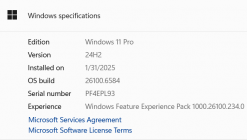
I've installed Quickload on Windows 11 Pro, no problem. I'm even running it on 24H2.
There is an option that you do NOT want to select and that's install icons. You won't be able to on 11.
There is an upgrade option, if you have an older version that is not compatible.
If you load QuickLOAD in native mode, it will work on Windows 11.
I have it working on my Windows 10 laptop and my Windows 11 desktop.
On my new desktop, I finally tried not just using the standard app to load, and went thought the load process that allows Windows to load QuickLOAD using the Windows 10 routines and not replacing them with the Windows 11 routines.
If you upgrade from Windows 10 to Window11, the upgrade process automatically uses that mechanism so all the old programs from your old Windows 10 base system will still function.
Yep. I own a commercial IT company. I have never heard of any issues with win11, ive installed it on 3 different win11 pro machines without a single issue or special process.. just run the exe..
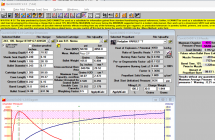
And for shits and giggles, I just installed QL on my Win11 Pro fully updated all latest updates laptop and not a single issue. Have it open and using it again no issue
Bought a new Windows 11 laptop to replace my who knows how old desktop that started on Windows 7 and has been rebuilt and upgraded several times. QuickLoad did not make the transition. Gordons Reloading Tool however made it without a hiccup.
Yep. I own a commercial IT company. I have never heard of any issues with win11, ive installed it on 3 different win11 pro machines without a single issue or special process.. just run the exe..
And for shits and giggles, I just installed QL on my Win11 Pro fully updated all latest updates laptop and not a single issue. Have it open and using it again no issue
This Forum's expenses are primarily paid by member contributions. You can upgrade your Forum membership in seconds. Gold and Silver members get unlimited FREE classifieds for one year. Gold members can upload custom avatars.