
• This Forum is for adults 18 years of age or over. By continuing to use this Forum you are confirming that you are 18 or older. No content shall be viewed by any person under 18 in California.

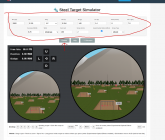
Steel target shooting range simulator.

I've been screwing around with adding some optical effects this morning. Lets you focus the scope on where its pointing and blurs based on depth of field. So if you focus on 100 yards 1000 is blurry when you zoom in. I'm thinking this might let me add a wind driven mirage effect since you can choose what range to focus on. Still not sure how well its going to work. Also think I might have just made myself a little nauseous staring at out of focus images for the last hour.

Also does anyone use the spotting scope? I do sometimes to look at some wind flags while I shoot. Not sure if I want to keep it or not. Kind of requires me to render the scene twice per frame with different cameras so I might be cutting the performance in half for not much benefit.
 
Shot to 600 adjusting with clicks and shot all of the smallest to largest at each range out to the 600 targets and some chucks, worked well on my old iPad. Using Starlink for wifi.

Can a shooter adjust the velocity, BC and standard deviation?
 
Shot to 600 adjusting with clicks and shot all of the smallest to largest at each range out to the 600 targets and some chucks, worked well on my old iPad. Using Starlink for wifi.

Can a shooter adjust the velocity, BC and standard deviation?
Yeah that's why I added those options at the top of the screen. Set them however you like or to your own rifle. This thing is basically a ballistic calculator with a 3D graphics / game like front end. You need to restart the game for any parameter changes to take effect. I just set the defaults to my 6.5 CM shooting 140 hybrids so it is playable as soon as the page loads.

Also fyi your internet speed really does not matter for this outside the initial load of the page. All the calculations, graphics, software runs in your browser and on your computer. Its not reaching out to some back-end server.

1764461595065.png
 
I think I got a pretty good and physically accurate mirage effect working. You can now read the wind without the flags. Before you start the sim you need to check the "Mirage/Optical Effects" box. Once enabled you will need to focus your scope (or spotting scope) on the distance you wish to read the mirage from. On desktop you simply point the crosshair at what you want to focus on and press F (or Shift+F for the spotting scope, which also has a small crosshair now). On mobile you can do a long press to focus (note: it focuses where you press, not where the crosshair is, unlike desktop). This will focus your scope on that distance and begin sampling the wind between 80% and 100% of that focal distance. The more you zoom in the more noticeable the mirage becomes. Likewise, farther objects get more mirage since you are looking through more air. The mirage has a constant upward drift (simulating rising heat) and the horizontal movement varies with the crosswind speed at the focal distance. For example, I was just testing it by shooting at the 1000-yard gongs. I had my rifle scope focused on 1000 yards, which reads the average wind between 800 and 1000 yards. Then I focused my spotting scope on the 300-yard berm to read my close wind. I used both of these mirage readings to do wind calls for 1000-yard shots.
 
I just pushed another update and added long range boar hunting as a feature. Was kind of a pain to get perfect trajectory collision with the boar based on how it is animated so the boar target is really just an invisible box around the boar that approximates its shape. Thinking I need to add some sort of range finder feature now. Very hard to tell how far away things are through the scope perspective.
Screenshot from 2025-12-01 08-42-24.png
 

Upgrades & Donations

This Forum's expenses are primarily paid by member contributions. You can upgrade your Forum membership in seconds. Gold and Silver members get unlimited FREE classifieds for one year. Gold members can upload custom avatars.


Click Upgrade Membership Button ABOVE to get Gold or Silver Status.

You can also donate any amount, large or small, with the button below. Include your Forum Name in the PayPal Notes field.


To DONATE by CHECK, or make a recurring donation, CLICK HERE to learn how.

Forum statistics

Threads
167,995
Messages
2,244,528
Members
80,929
Latest member
Hipshot4570
Back
Top
