


Forum Boss
Administrator
It's easy to follow threads you start or in which you reply. Setting this up is a bit different than with our old Forum software, but once you get the hang of it... you should find it very easy.
First, if you want to always follow threads you started, you can set that by default (so you follow EVERY thread you start).
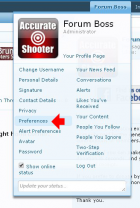
To do this, click on your Forum name at the upper right. Then Select "Preferences":
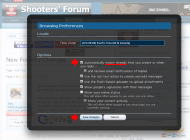
Now select "Automatically Watch Threads" and click "Save Changes". (You also have a choice to receive emails when folks reply to your thread.)
Following Threads One at a Time -- Threads You Start
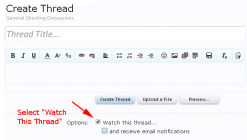
You can also watch (or "subscribe") any thread you start. Simply click the "Watch Thread" option when you create the thread with your first post:
Following Threads in Which You Reply
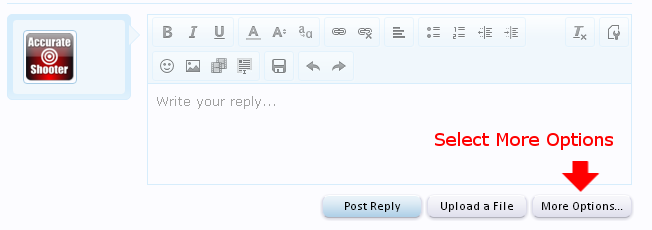
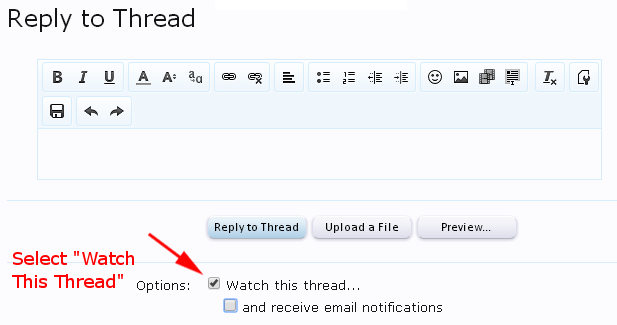
You can follow any thread in which you post a reply. As you are replying, click the "More Options" button. Then select "Watch This thread". That's all there is to it!
First, if you want to always follow threads you started, you can set that by default (so you follow EVERY thread you start).
To do this, click on your Forum name at the upper right. Then Select "Preferences":
Now select "Automatically Watch Threads" and click "Save Changes". (You also have a choice to receive emails when folks reply to your thread.)
Following Threads One at a Time -- Threads You Start
You can also watch (or "subscribe") any thread you start. Simply click the "Watch Thread" option when you create the thread with your first post:
Following Threads in Which You Reply
You can follow any thread in which you post a reply. As you are replying, click the "More Options" button. Then select "Watch This thread". That's all there is to it!


